
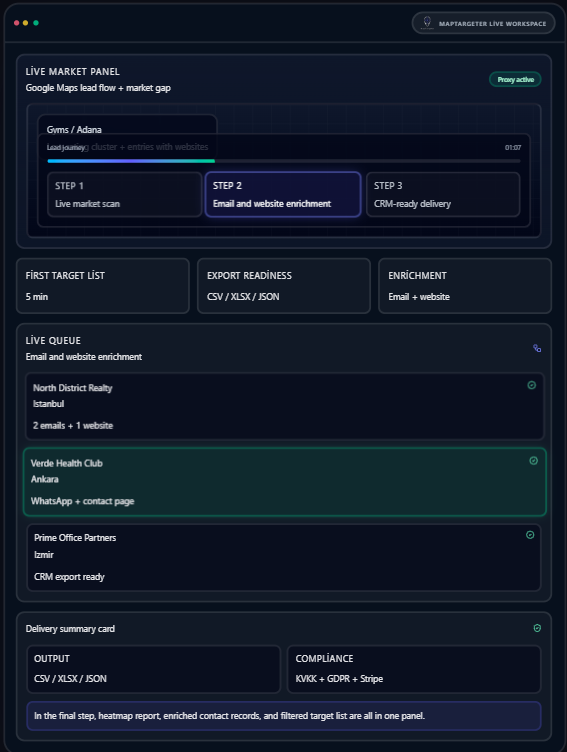
Turn Google Maps data into target lists, emails, and market insight
MapTargeter unifies Google Maps Scraper, Email Finder, and heatmap-based market analysis in one dashboard. Search, enrich, and export to CRM in a single flow.
Deliver your lead list to the tools you
already use
Ready-to-use exports for HubSpot, Salesforce, Zapier, Make, Google Sheets, Airtable, Notion,
and Pipedrive.
Google Sheets
HubSpot
Zapier
Airtable
Notion
Pipedrive
Google Sheets
HubSpot
Zapier
Airtable
Notion
Pipedrive
Data extraction, contact enrichment, and market visualization in one dashboard
Search, enrichment, and CRM export in a single workflow.
Google Maps Scraper
Pull target businesses by location, category, and rating thresholds. City, district, and category-based data collection.
Email Finder
Identify verifiable contact channels for businesses. Enrichment from website, footer, and contact signals.
Heatmap Analysis
Visualize location density on the map. Spot market gaps and competition layers at a glance.
Export (CSV / XLSX / JSON)
Export filtered datasets to CRM or BI workflows. Secure payment via Stripe; GDPR-compliant output.
Smart Filtering and Segmentation
Build target lists by industry, rating, review volume, and contact data. Proxy-friendly scraping.
Adapt the product to your business model
Ready-made use cases and detailed solution pages.
Lead finding for real estate
Map local business networks and spot portfolio expansion opportunities
Data mining for sales teams
Feed cold-call lists with up-to-date, contactable data.
Regional market scanning for agencies
Produce city-based market reports and target lists for agency clients.
Location analysis for franchise and e-commerce
Read competitive density and speed up investment decisions for the night location.
Choose the plan that fits you
Transparent pricing in USD. Try without a credit card
Free
Explore the product with core search capabilities.
/ month
50 credits / month
10 results / page
Rich-result search view
Search history
Upgrade when you need more volume
Starter
Ideal for individual users and small projects.
/ month
1,000 credits / month
20 results / page
CSV / Excel / JSON export
30-day search history
Background search processing
Growth
For growing teams and higher data needs.
/ month
3,000 credits / month
40 results / page
Email discovery and verification
PNG / PDF visual exports
90-day search history
Business
For enterprise use and full platform access.
/ month
10,000 credits / month
60 results / page
Full API access
Priority analytics and exports
365-day search history
Credit top-ups
Available to paid plan subscribers only.
1,000 credits — $25
5,000 credits — $99
20,000+ credits — Contact Sales
Don’t waste time
Thousands of users have explored the platform with free credits. No credit card required.
Frequently asked questions
Each map search (location or list query), each email finder result, and each API request uses 1 credit. Viewing, filtering, or downloading previously fetched data in the dashboard does not use credits. You can track your credit usage in real time from account settings.
Each plan has a monthly credit quota. Credits are renewed automatically at the start of each billing period (according to your monthly or annual plan). Unused credits do not roll over. If you exceed your quota, you can buy an extra credit pack or upgrade your plan.
When your monthly credits are used up, new map searches and email finder are unavailable; viewing and exporting your existing data continues. Credits renew at the start of the period. You can also continue with an extra credit pack or by upgrading to a higher plan.
Map data is synced daily from up-to-date sources; fields like business name, address, phone, and website are updated regularly. Email addresses are checked with verification services. We cannot guarantee 100% accuracy as businesses can change at any time; we recommend your own verification for critical use cases.
The email finder infers professional addresses from domain and name matching and checks validity with verification. Accuracy varies by source and freshness; in general, valid format and delivery rates are high. We still recommend a soft launch and bounce tracking for bulk email campaigns.
You can report source errors or outdated information to our support team; we try to update the source side where possible. Credit refund requests for a specific query are considered in cases of repeated errors or system-related issues. Contact us via support.
You can cancel with one click from Settings > Subscription in the dashboard. No need to update your card or payment details. After cancelling, you keep access until the end of your billing period; then your account is set to read-only.
Unused credits or partial periods are not refunded automatically. Even if you cancel after the billing period has started, you keep access for that period. In special cases (technical issues, incorrect billing, etc.) you can contact our support team to request a review.
After you cancel your subscription, you can access all your data and export features until the end of your billing period. From then on your account is read-only; your data is retained for 30 more days, during which you can export. After 30 days, data is deleted and cannot be recovered.